
All posts in " kafka "

Messaging Architectures for Cloud-Native Applications

1. Traditional Applications and Monoliths

Do you remember the times we used to create applications by creating data models regarding the business domains and use those data models as the reflection of the relational database objects -mostly tables- in order to do CRUD actions?

Business requirements were pouring from the waterfall and making us so soaking wet that we could not easily respond to change: new business requirements, bug fixes, enhancements, etc.

When Agile methodologies came out, after some time, this made us more flexible and respond to change very quickly whereas there came out some ideas of SOA, service bus, distributed state management, etc. but business domains stayed kind of merged and monoliths survived.

Monolith applications -which is actually not an anti-pattern- ruled the world for a considerable number of years with different kinds of architectures that have their own benefits and drawbacks.
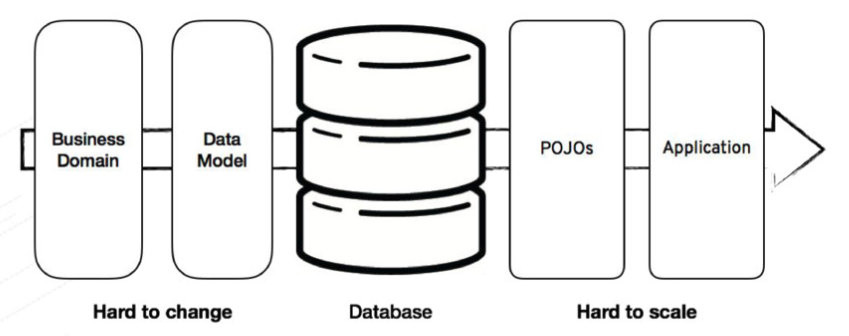
Figure 1. Traditional Application Design. https://speakerdeck.com/mbogoevici/data-strategies-for-microservice-architectures?slide=4

1.1. Benefits and Drawbacks

The Benefits:

  • Easy to start with
  • Easy transaction management
  • Sync communication
  • Can be powered-up with the modular architecture

The Drawbacks:

  • Hard to change business domain and data model
  • Hard to scale
  • Tightly coupled components

2. Cloud-Native Applications and Microservices

One of the best motivations for approaches like Domain Driven Design is being monoliths’ tightly coupled between business domains and the need of separating those domains in order to loosen the coupling and provide single responsibility for each domain as bounded contexts.
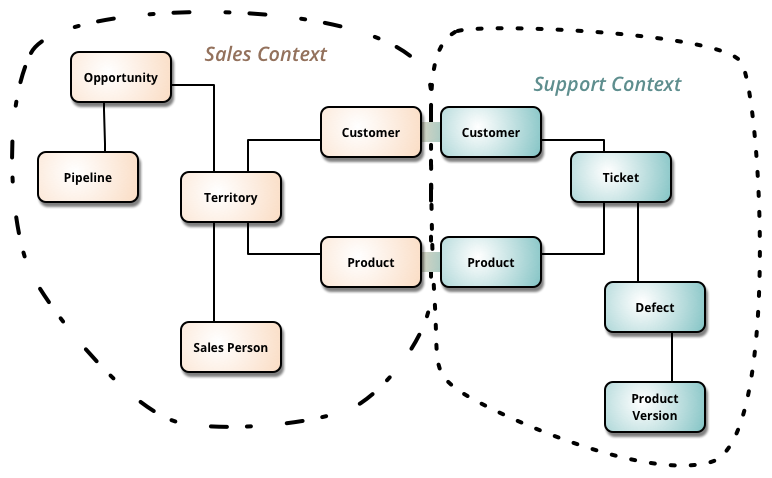
Figure 2. Bounded Contexts. https://martinfowler.com/bliki/BoundedContext.html

So these kinds of approaches led to microservices’ creation with the motivation of loosely coupling between bounded contexts, being polyglot, which means using best-fitting tools for the relevant service, easily being scalable horizontally, and most importantly with these benefits, being able to easily adapt into the could-native world.

Apart from creating a lot of benefits on the microservices side, microservices and the cloud-native application architecture has some challenges that may turn a developer’s life into a nightmare.

2.1. Challenges

Microservice architectures have many challenges like manageability of the services, traceability, monitoring, service discovery, distributed state and data management, and resilience which are handled automatically by cloud-native platforms like Kubernetes. For example service discovery is one of the requirements of an application that consists of microservices and Kubernetes provides this service discovery mechanism on its own side.
What cloud-native platforms can not provide and leave it to the guru developers is state management itself.

2.1.1. State

In order to keep the state in a distributed system and make it flew through the microservices has some challenges. Keeping the state in a distributed cache system like Infinispan and create a kind of single source of truth for the state is a common pattern but in the mesh of the service, it is tough to manage since there will be an Inception of caches.

Keeping the state distributed through services is even tougher.
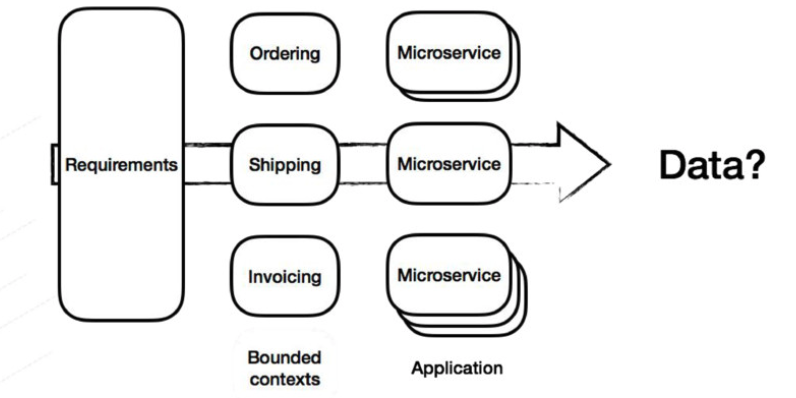
Figure 3. Microservices & Data. https://speakerdeck.com/mbogoevici/data-strategies-for-microservice-architectures?slide=5

As Database-per-microservice is a common pattern and as each bounded context should have and handle its own data, -with the need of sharing the state/data through services- this makes direct point-to-point communication between microservices more important.

2.1.2. Synchronous Communication

Synchronous data retrieval is a way to get the data that is needed from a microservice to another microservice. One can use comparingly new technologies like HTTP+REST, gRPC, or some old school technologies like RMI and IIOP, but all these synchronous point-to-point styles of data retrieval have some costs.
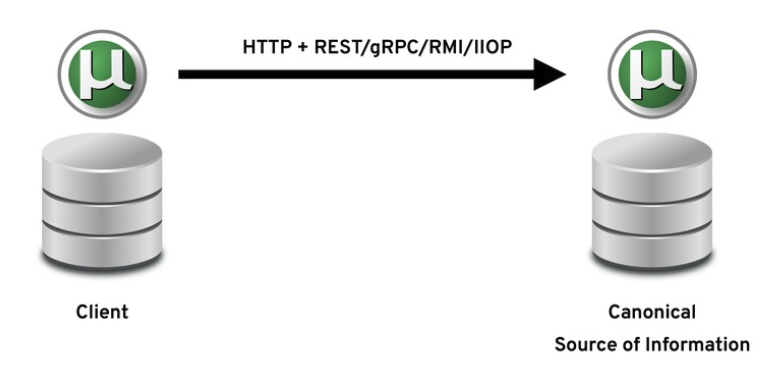
Figure 4. Synchronous Data Retrieval. https://speakerdeck.com/yanaga/distribute-your-microservices-data-with-events-cqrs-and-event-sourcing?slide=5

Latency is one of the key points of messaging between services and with synchronous communication if one of the services whose data will be retrieved has some performance problems in itself, it will be able to serve the data with a bit of latency that may cause data retrieval latency or timeout exceptions.

Or a service may have some failure inside and is not available that specific time period the sync data call won’t work.

Also, any performance issues on the network will directly either affect the latency or service availability. So it is up to the network’s being reliable.

We know that there are some patterns like distributed caching, bulkhead, and circuit breaker patterns for handling this kind of failure scenario by implementing fault tolerance strategies, but is it really the right way to do it?

2.2. Challenging the Challenges

So there are some solutions which some of them are invented years ago, but still rigid enough to be a ‘solution’ while others are brand-new architectures that will help us for challenging the challenges of cloud-native application messaging and communications.

Let’s start by taking a look at the common asynchronous messaging architectures before jumping into the solutions.

2.2.1. Asynchronous Messaging and Messaging Architectures

Like synchronous communication, asynchronous communication -or in other words messaging– has to be done over protocols. Two sides of the communication should agree on the protocol, so that message data that is either forecasted or consumed can be understood by the consumer.

While HTTP+REST protocol is the most used protocol for synchronous communication, there are several other protocols that asynchronous messaging systems widely use; like AMQP, STOMP, XMMP, MQTT, or Kafka protocols.

There are three main types of messaging models:

  • Point-to-point
  • Publish-subscribe (Pub-sub)
  • Hybrid
Point-to-Point

Point-to-point messaging is like sending a parcel via mail post services. You go to a post office, write the address you want the parcel to be delivered to, and post the parcel knowing it will be delivered sometime later. The receiver does not have to be at home when the parcel is sent and at some point later the parcel will be received at the address.

Point-to-point messaging systems are mostly implemented as queues that use the first-in, first-out (FIFO) order. So this means that only one subscriber of a queue can receive a specific message.
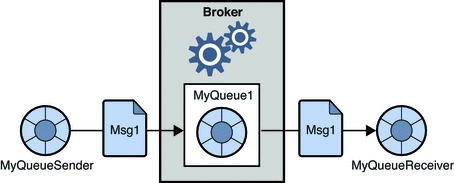
Figure 5. Point-to-Point Messaging. https://docs.oracle.com/cd/E19340-01/820-6424/aerbj/index.html

This opens the conversation of queues are being durable, which means if there are no active subscribers the messaging system will retain the messages until a subscriber comes and consumes them.

Point-to-point messaging is generally used for the use cases of calling for a message to be acted upon once only as queues can best provide an at-least-once delivery guarantee.

Publish-Subcribe

In order to understand how publish-subscribe (pub-sub) works think that you are an attendee on a webinar. When you are connected you can hear and watch what the speaker says, along with the other participants. When you disconnect you miss what the speaker says, but when you connect again you are able to hear what is being said.

So the webinar works like a pub-sub mechanism that while all the attendees are subscribers, the speaker is the broadcaster/publisher.

Pub-sub mechanisms are generally implemented through topics that act like the webinar broadcast to be subscribed. So when a message is produced on a topic, all the subscribers get it since the message is distributed along.
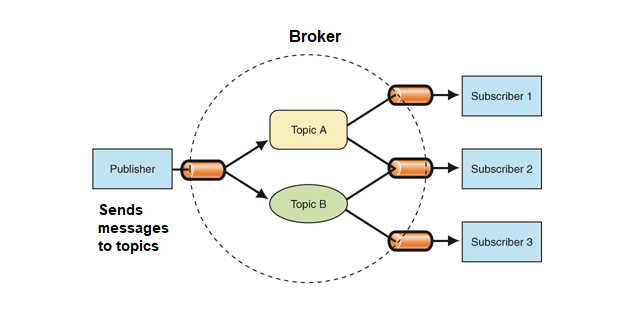
Figure 6. Publish-Subscribe Messaging. https://engineering.carsguide.com.au/laravel-pub-sub-messaging-with-apache-kafka-3b27ed1ee5e8

Topics are nondurable, unlike the queues. This means that a subscriber/consumer that is not consuming any messages -as it might be not running etc.-, misses the broadcasted messages in that period of being off. So this means that topics can provide a at-most-once delivery guarantee for each subscriber.

Hybrid model

Hybrid models of messaging systems both include the point-to-point and publish-subscribe as the use cases generally require a messaging system that has many consumers who want a copy of the message with full durability; in other words without message loss.

Technologies like ActiveMQ and Apache Kafka both implement this hybrid model with their own ways of persistence and distribution mechanisms.

Durability is a key factor especially on Cloud-Native distributed systems since the persistence of the state and being able to somehow replay it plays a key role in component communication. By adding it the capabilities of the publish-subscribe mechanism decrease the dependencies between components/services/microservices as it has the power of persisting and getting the message again either with the same subscriber or another one.

So the hybrid messaging systems are very vital when it comes to passing states as messages through Cloud-Native microservices as events since event-driven distributed architectures require these capabilities.

2.2.2. Events & Event Sourcing

As a process of developing microservice-based cloud-native architectures, approaches like Domain-Driven Design (DDD) makes it easy to divide the bounded contexts and see the sub-domains related to the parent domain.

One of the best techniques to separate and define the bounded contexts is the Event Storming technique, which takes the events as entry points and emerges everything including commands, data relationships, communication styles, and most importantly combobulators which are mostly mapped as bounded contexts.
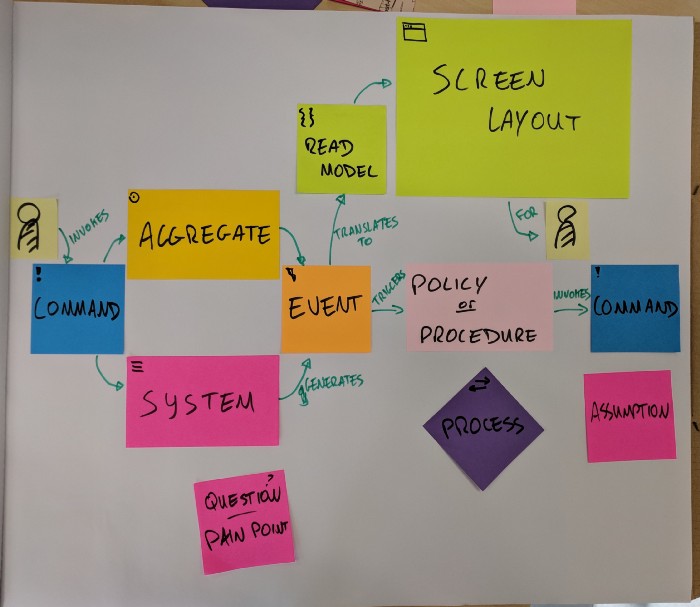
Figure 7. Events Storming Components. https://medium.com/@springdo/a-facilitators-recipe-for-event-storming-941dcb38db0d

After all when most of the event storming map emerges, one can see all communication points between bounded contexts which are mostly mapped as microservices or services in the system that has their own database and data structure.
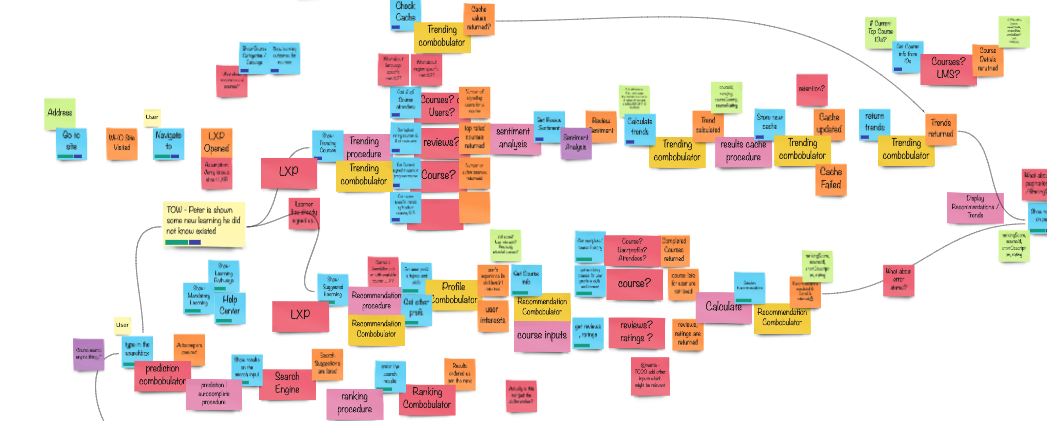
Figure 8. A real-life Event Storming example;)

This structure, as it all consists of events, gives the main idea of using async communication via a publish-subscribe system that queues the events to be consumed, in other words, doing Event Sourcing.

Event Sourcing is a state-event-message pattern that captures all changes to an application state as a sequence of events that can be consumed by other applications -in this case, microservices.
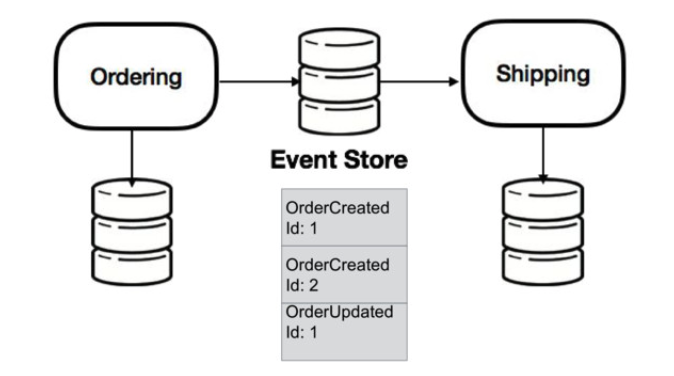
Figure 9. Event Sourcing. https://speakerdeck.com/mbogoevici/data-strategies-for-microservice-architectures?slide=14

Event Sourcing is very important in a distributed cloud-native environment because in the cloud-native world microservices can easily be scaled, new microservices can join or -from an application modernization perspective- microservices can be separated from their big monolith mother in order to make it live its own life.

So having the capability of an asynchronous publish-subscribe system that has the durability of data or ability to replay is very important. Additionally, queueing the events rather than the final data makes it flexible for other services which means implementing dependency inversion in an asynchronous environment with the capability of eventual consistency.

The question here is: How to create/trigger those events?

There are many programmatic ways rather than languages or framework libraries to create events and publish them. One can create database listeners or interceptors programmatically (like Hibernate Envers does) or can handle them in the DAO (Data Access Object) or service layer of the application. Even so, creating an Event Sourcing mechanism is not easy.

At this point, a relatively new pattern comes as a savior: Change Data Capture.

2.2.3. Change Data Capture

Change Data Capture (CDC) is a pattern that is used to track the data change -mostly in databases- in order to take any action on it.
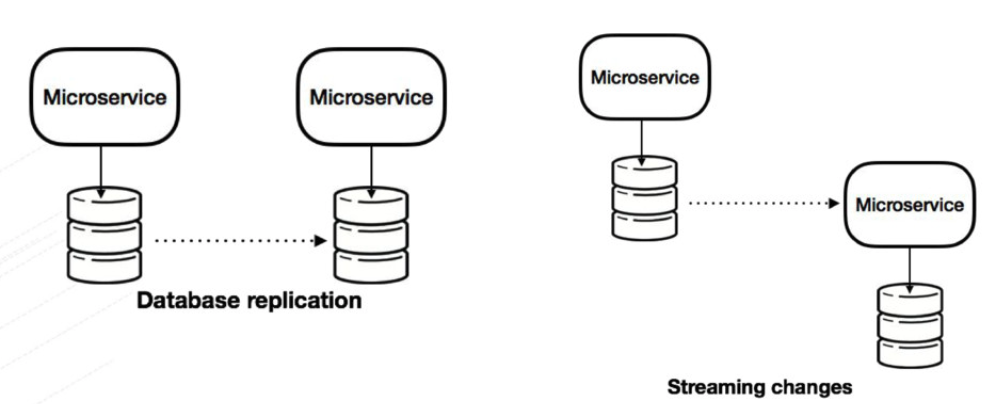
Figure 10. Change Data Capture. https://speakerdeck.com/mbogoevici/data-strategies-for-microservice-architectures?slide=15

A CDC mechanism should listen to the data change, and create the event that includes the change as Create, Insert, Update, Delete actions, and the data change itself. After creating the action it can be published to any durable pub-sub system in order to be consumed.

In order to decouple the database change event listening capability from the application code, it is one of the best patterns that is used for event-driven architectures of cloud-native applications.

Debezium is probably the most popular open-source implementation nowadays because of its easy integration with a popular set of databases and Apache Kafka, especially on platforms like Kubernetes/OpenShift.
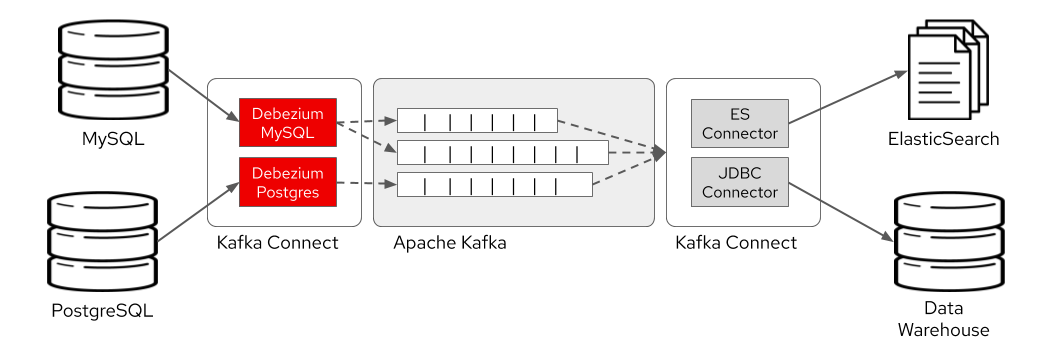
Figure 11. CDC with Debezium. https://developers.redhat.com/blog/2020/04/14/capture-database-changes-with-debezium-apache-kafka-connectors/

Now that, we have our event sourcing listener and creator as a CDC implementation like Debezium and let’s say we use Apache Kafka for event distribution between microservices.

Since the data we are creating is not the data itself but the change subscribed microservice should get the change and reflect it to its database. This change -when it comes again a microservice having a database of its own because it’s being a bounded context– is generally used for the read purpose rather than its being a write on the database because it is a reflection of the event that is just triggered by another write on another database.

So this makes us recall a pattern -that is already automatically implemented by design in the sample of ours- that’s been used for many years especially by enterprise-level relational databases: CQRS.

2.2.4. Command Query Responsibility Segregation (CQRS)

CQRS is a pattern that suggests one to separate the read model from the write model, mainly with the motivation of separation of concerns and performance.
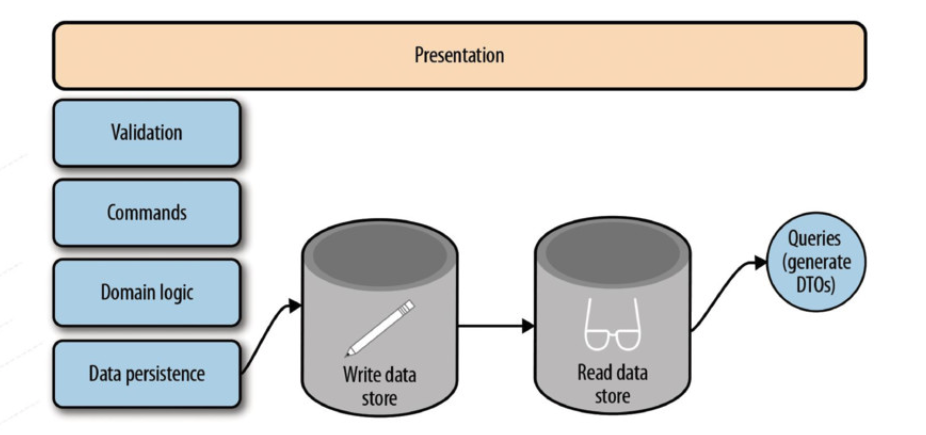
Figure 12. CQRS with Separate Datastores. https://speakerdeck.com/mbogoevici/data-strategies-for-microservice-architectures?slide=20

In a cloud-native system that has a set of polyglot microservices that has its own database -either as relational or NoSQL- the CQRS pattern fits well since each microservice has to have the data reflection of the dependent/dependee application.

2.3. Solutions Assemble: State Propagation

So in our imaginary, well-architected, distributed cloud-native system, in order to make our microservices communicate and transfer their state, we called the best of breed super-heroic patterns -some of which has great implementations.
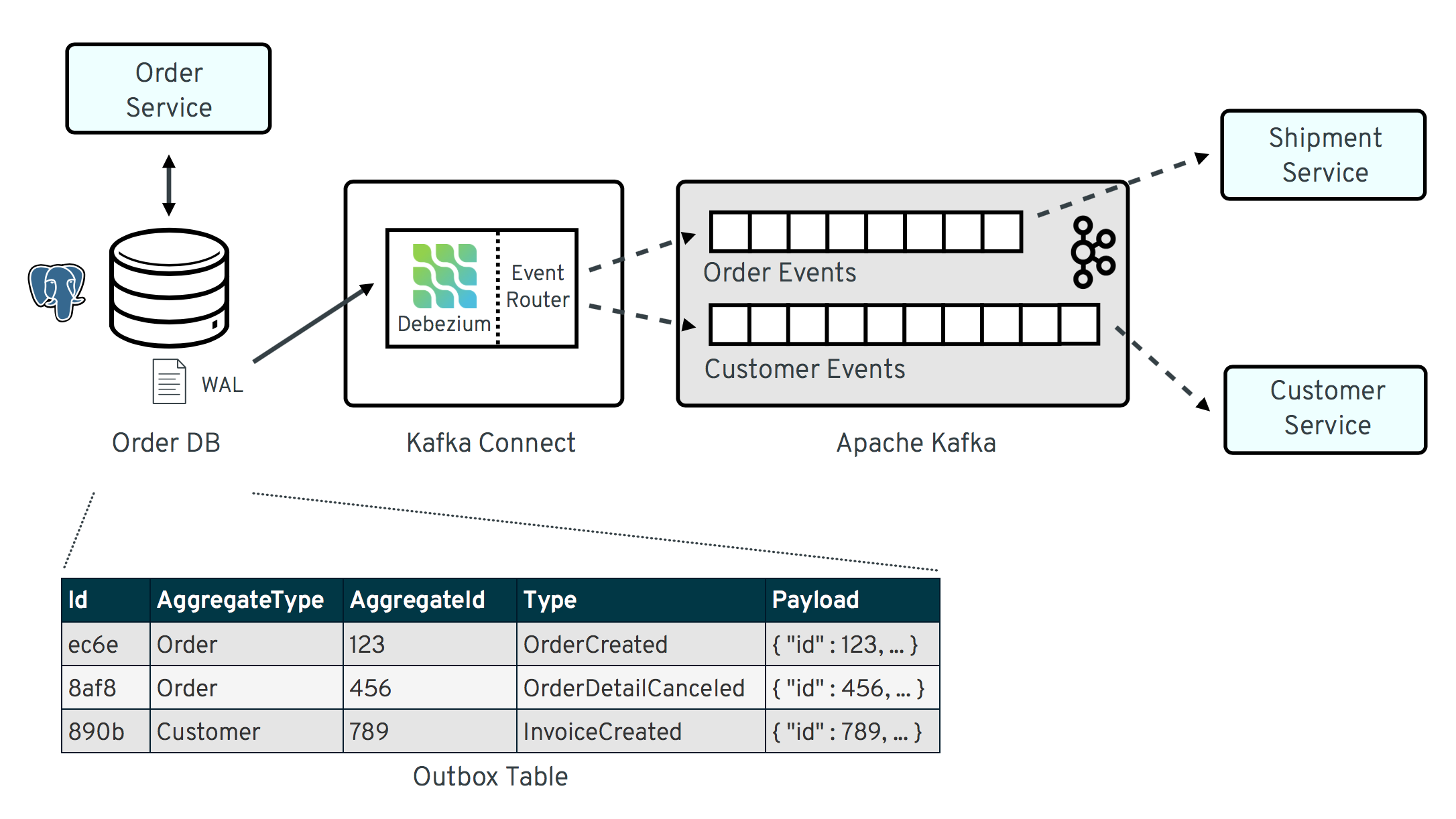
Figure 13. State Propagation & Outbox Pattern. https://debezium.io/blog/2019/02/19/reliable-microservices-data-exchange-with-the-outbox-pattern/

This state transfer through an asynchronous system that has the durability and pub-sub ability like Apache Kafka, triggered by a change data capture mechanism like Debezium, writing to a component which creates the event data to be read by another component is all called State Propagation which is backed by the Outbox pattern on the microservices side.

To sum up all, getting all the solutions altogether state propagation and creating event-driven mechanisms with CDC, Event Sourcing and CQRS help us in a very elegant way in order to solve the challenges of the cloud-native microservices era.

Resources

Books
  • Jakub Korab. ‘Understanding Message Brokers’. O’Reilly Media, Inc. ISBN 9781491981535.
  • Todd Palino, Gwen Shapira, Neha Narkhede. ‘Kafka: The Definitive Guide’. O’Reilly Media, Inc. ISBN 9781491936160.
Videos
Presentations
Website Articles
Continue reading >
Share

Bootstrap Kafka on Kubernetes (Strimzi) with Just 5 Commands

1 – Install Strimzi Kafka CLI

sudo pip install strimzi-kafka-cli

2 – Create project namespace on Openshift/Kubernetes

oc new-project kafka

3 – Install Strimzi Kafka Operator

kfk operator --install -n kafka

4 – Create Kafka Cluster

kfk clusters --create --cluster my-cluster -n kafka

5 – Create a Kafka topic

kfk topics --create --topic my-topic --partitions 12 --replication-factor 3 -n kafka -c my-cluster

Let’s try it out!

kfk console-producer --topic my-topic -n kafka -c my-cluster
kfk console-consumer --topic my-topic -n kafka -c my-cluster

Special thanks to Timecop1983 for the great music!

Continue reading >
Share

Simple ACL Authorization on Strimzi using Strimzi Kafka CLI

Simple ACL Authorization

In the previous example we implemented TLS authentication on Strimzi Kafka cluster with Strimzi Kafka CLI. In this example, we will be continuing with enabling the ACL authorization, so that we will be able to restrict access to our topics and only allow the users or groups we want to.

Let's first see our cluster list.

kfk clusters --list
NAMESPACE    NAME              DESIRED KAFKA REPLICAS   DESIRED ZK REPLICAS
kafka        my-cluster        3                        3

IMPORTANT

You should have a cluster called my-cluster on the namespace kafka we created before. If you don't have the cluster and haven't yet done the authentication part please go back to the previous example and do it first since for authorization you will need authentication to be set up before.

Also please copy the truststore.jks and the user.p12 files or recreate them as explained in the previous example and put it along the example folder which we ignore in git.


Considering you have the cluster my-cluster on namespace kafka, let's list our topics to see the topic we created before:

kfk topics --list -n kafka -c my-cluster
NAME                                                          PARTITIONS   REPLICATION FACTOR
consumer-offsets---84e7a678d08f4bd226872e5cdd4eb527fadc1c6a   50           3
my-topic                                                      12           3

Lastly let's list our user that we created previously, which we will be setting the authorization for.

kfk users --list -n kafka -c my-cluster
NAME      AUTHENTICATION   AUTHORIZATION
my-user   tls

As you can see we have the my-user user that we created and authenticated in the previous example.

Now let's configure our cluster to enable for ACL authorization. We have to alter our cluster for this:

kfk clusters --alter --cluster my-cluster -n kafka

and put the simple authorization definitions under kafka like the following:

authorization:
  type: simple

After saving the cluster configuration wait for the brokers to be rolling updated by checking their status:

watch kubectl get pods -n kafka

Now it's time to run the producer and consumer to check if authorization is enabled:

kfk console-producer --topic my-topic -n kafka -c my-cluster --producer.config client.properties
ERROR Error when sending message to topic my-topic with key: null, value: 4 bytes with error: (org.apache.kafka.clients.producer.internals.ErrorLoggingCallback)
org.apache.kafka.common.errors.TopicAuthorizationException: Not authorized to access topics: [my-topic]
kfk console-consumer --topic my-topic -n kafka -c my-cluster --consumer.config client.properties
ERROR Error processing message, terminating consumer process:  (kafka.tools.ConsoleConsumer$)
org.apache.kafka.common.errors.TopicAuthorizationException: Not authorized to access topics: [my-topic]
Processed a total of 0 messages

As you might also observe, both the producer and consumer returned TopicAuthorizationException by saying Not authorized to access topics: [my-topic]. So let's define authorization access to this topic for the user my-user.

In order to enable user's authorization, we have to both define the user's authorization type as simple for it to use SimpleAclAuthorizer of Apache Kafka, and the ACL definitions for the relevant topic -in this case it is my-topic. To do this, we need to alter the user with the following command options:

kfk users --alter --user my-user --authorization-type simple --add-acl --resource-type topic --resource-name my-topic -n kafka -c my-cluster

The --add-acl option requires arguments like:


--operation TEXT                Operation that is being allowed or denied.
                                  (default: All)

--host TEXT                     Host which User will have access. (default:
                              *)

--type [allow|deny]             Operation type for ACL. (default: allow)
--resource-type TEXT            This argument is mutually inclusive with
                              ['add_acl', 'delete_acl']

--resource-name TEXT            This argument is mutually inclusive with
                              ['add_acl', 'delete_acl']

In this example we only used --resource-type and --resource-name since those are the required fields and others have some defaults that we could use.

So in this case we used the defaults of type:allow, host:* and operation:All. The equal command should look like this:

kfk users --alter --user my-user --authorization-type simple --add-acl --resource-type topic --resource-name my-topic --type allow --host * --operation All -n kafka -c my-cluster

In order to see the ACL that is defined for allowing all operations of my-topic for the user my-user, let's describe it, in this case as YAML format:

kfk users --describe --user my-user -n kafka -c my-cluster -o yaml
apiVersion: kafka.strimzi.io/v1beta1
kind: KafkaUser
metadata:
...
spec:
  authentication:
    type: tls
  authorization:
    type: simple
    acls:
    - host: '*'
      operation: All
      resource:
        name: my-topic
        patternType: literal
        type: topic
      type: allow
status:
...

As you can see the user has the authorization defined as simple and ACL that allows all (read, write, describe) access for my-topic from this user.

Now with the updated configuration let's run our producer and consumer again:

kfk console-producer --topic my-topic -n kafka -c my-cluster --producer.config client.properties
>message1
>message2
>message3
>

It seems that we are able to produce messages to my-topic. Let's consume those messages then:

kfk console-consumer --topic my-topic -n kafka -c my-cluster --consumer.config client.properties
ERROR Error processing message, terminating consumer process:  (kafka.tools.ConsoleConsumer$)
org.apache.kafka.common.errors.GroupAuthorizationException: Not authorized to access group: console-consumer-96150
Processed a total of 0 messages

Whoops! It did not work like the producer. But why? Because the consumer group that is randomly generated for us (because we did not define it anywhere) doesn't have at least read permission on my-topic topic.


IMPORTANT

In Apache Kafka, if you want to consume messages you have to do it via a consumer group. You might say that "we did not specify any consumer group while using the console consumer". Well just like the traditional console consumer of Kafka, it uses a randomly created consumer group id so you have a consumer group but it is created for you (like the one above as console-consumer-96150) since we did not define one previously.


Ok then. Now let's add the ACL for a group in order to give read permission for my-topic topic. Let's call this group my-group, which we will also use it as the group id in our consumer client configuration. This time let's use kfk acls command which works like kfk users --alter --add-acl command. In order to give the best traditional experience to Strimzi CLI users, just like the traditional bin/kafka-acls.sh command, we have the kfk acls command which works mostly the same with the traditional one.

With the following command, we give the my-group group the read right for consuming the messages.

kfk acls --add --allow-principal User:my-user --group my-group --operation Read -n kafka -c my-cluster

After adding the ACL, let's check whether our user has the ACL for the group or not:

kfk users --describe --user my-user -n kafka -c my-cluster -o yaml

In the acls section of the YAML you can see the entries are added:

    - host: '*'
      operation: Read
      resource:
        name: my-group
        patternType: literal
        type: group
      type: allow

You can list the ACLs with the following command as well which lists all the ACLs Kafka natively:

kfk acls --list -n kafka -c my-cluster
Current ACLs for resource `ResourcePattern(resourceType=GROUP, name=my-group, patternType=LITERAL)`:
 	(principal=User:CN=my-user, host=*, operation=READ, permissionType=ALLOW)

Current ACLs for resource `ResourcePattern(resourceType=TOPIC, name=my-topic, patternType=LITERAL)`:
 	(principal=User:CN=my-user, host=*, operation=ALL, permissionType=ALLOW)

Or you can list topic and group ACLs seperately:

kfk acls --list --topic my-topic -n kafka -c my-cluster
Current ACLs for resource `ResourcePattern(resourceType=TOPIC, name=my-topic, patternType=LITERAL)`:
 	(principal=User:CN=my-user, host=*, operation=ALL, permissionType=ALLOW)

For the group ACLs:

kfk acls --list --group my-group -n kafka -c my-cluster
Current ACLs for resource `ResourcePattern(resourceType=GROUP, name=my-group, patternType=LITERAL)`:
 	(principal=User:CN=my-user, host=*, operation=READ, permissionType=ALLOW)

The only thing we have to do right now is to put the group id definition in our client.properties file:

security.protocol=SSL
ssl.truststore.location=./truststore.jks
ssl.truststore.password=123456
ssl.keystore.location=./user.p12
ssl.keystore.password=123456
group.id=my-group

Running the consumer again with the updated client configuration -this time consuming from the beginning- let's see the previously produced logs:

kfk console-consumer --topic my-topic -n kafka -c my-cluster --consumer.config client.properties --from-beginning
message1
message2
message3

Voilà!

We are able to configure the Strimzi cluster for ACL authorization, define ACLs easily with different methods and use the client configurations successfully with Strimzi Kafka CLI.

Access the repo of this post from here: https://github.com/systemcraftsman/strimzi-kafka-cli/tree/master/examples/3_simple_acl_authorization

If you are interested more, you can have a look at the short video where I explain the Simple ACL authorization example here:

Take care👋

Continue reading >
Share

TLS Authentication on Strimzi by using Strimzi Kafka CLI

TLS Authentication

In this example we will demonstrate setting up TLS authentication for Strimzi using Strimzi Kafka CLI. So let's get started!

First lets list the clusters and see our clusters list.

kfk clusters --list

IMPORTANT

If you don't have any Kafka cluster that is created on your OpenShift/Kubernetes, pls. see the Strimzi Quick Start document or simply use:

kfk clusters --create --cluster my-cluster -n kafka

Assuming we have a cluster called my-cluster already set up for us let's list the topics in the cluster

kfk topics --list -n kafka -c my-cluster

If it is a new cluster probably there is no topic living in the cluster yet. So let's create a new topic for our example.

Create a topic called my-topic with 12 partitions and replication factor 3 in my-cluster cluster

kfk topics --create --topic my-topic --partitions 12 --replication-factor 3 -n kafka -c my-cluster

Run console producer to produce messages to my-topic

kfk console-producer --topic my-topic -n kafka -c my-cluster

Run console consumer to consume messages from my-topic

kfk console-consumer --topic my-topic -n kafka -c my-cluster

After being sure to produce and consume messages without a problem, now lets enable the authentication for TLS. In Strimzi, if you want to enable authentication, there are listeners configurations that provides a couple of authentication methodologies like scram-sha-512, oauth and tls.

In order to enable the authentication we have to alter our Kafka cluster:

kfk clusters --alter --cluster my-cluster -n kafka

An editor will be opened in order to change the Strimzi Kafka cluster configuration. Since Strimzi Kafka cluster resource has many items inside, for now, we don’t have any special property flag in order to directly set the value while altering. That’s why we only open the cluster custom resource available for editing.

In the opened editor we have to add the following listeners as:

listeners:
  plain: {}
  tls:
    authentication:
      type: tls

If you want to fully secure your cluster you have to also change the plain listener for authentication, because with the upper configuration unless we use a client configuration that doesn’t use SSL security protocol it will use the plain one which doesn’t require any authentication. In order to do that, we can tell the plain listener in cluster config to use one of the authentication methodologies among scram-sha-512 or oauth. In this example we will set it as scram-sha-512 but we will show the authentication via scram-sha-512 in another example.

So the latest listener definition should be like this:

listeners:
  plain:
    authentication:
      type: scram-sha-512
  tls:
    authentication:
      type: tls

Save the file and see the successfully edited message.

After the configuration change all the broker pods will be updated one by one, thanks to our operator. You can watch the pods state since we have to wait till each of them are in ready state.

watch kubectl get pods -n kafka

Now lets run our console producer and consumer again and see what happens:

kfk console-producer --topic my-topic -n kafka -c my-cluster
kfk console-consumer --topic my-topic -n kafka -c my-cluster

You got some WARN log messages saying disconnected (org.apache.kafka.clients.NetworkClient) from both producer and consumer right?

When we check the first pod logs that we ran the producer and consumer commands we can see the failed authentication message:

kubectl logs -f my-cluster-kafka-0 -c kafka -n kafka
2020-09-22 11:18:33,122 INFO [SocketServer brokerId=0] Failed authentication with /10.130.2.58 (Unexpected Kafka request of type METADATA during SASL handshake.) (org.apache.kafka.common.network.Selector) [data-plane-kafka-network-thread-0-ListenerName(PLAIN-9092)-SASL_PLAINTEXT-3]

Since we are not yet using SSL for authentication, but the PLAIN connection method, which we set up as scram-sha-512, we can not authenticate to the Strimzi Kafka cluster.

In order to login this cluster via SSL authentication we have to;

  • Create a user that uses TLS authentication
  • Create truststore and keystore files by getting the certificates from Openshift/Kubernetes cluster
  • Create a client.properties file that is to be used by producer and consumer clients in order to be able to authenticate via TLS

Let's first create the user with the name my-user:

kfk users --create --user my-user --authentication-type tls -n kafka -c my-cluster

After creating the user let's describe it to view a few attributes:

kfk users --describe --user my-user -n kafka -c my-cluster

At the bottom of the details of the user; in the status section, you can see a secret and a username definition:

Name:         my-user
Namespace:    kafka
Labels:       strimzi.io/cluster=my-cluster
Annotations:  <none>
API Version:  kafka.strimzi.io/v1beta1
Kind:         KafkaUser
Metadata:
  Creation Timestamp:  2020-09-21T12:54:52Z
  Generation:          3
  Resource Version:    53996010
  Self Link:           /apis/kafka.strimzi.io/v1beta1/namespaces/kafka/kafkausers/my-user
  UID:                 1c1dad0c-4e7a-4e63-933c-a785e6941021
Spec:
  Authentication:
    Type:  tls
Status:
  Observed Generation:     3
  Secret:                  my-user
  Username:                CN=my-user
Events:                    <none>

This means that a secret named my-user is created for this user and with the username CN=my-user as a common name definition.

In the secrets there are private and public keys that should be imported in the truststore and the keystore files that will be created shortly.

kubectl describe secret/my-user -n kafka
Name:         my-user
Namespace:    kafka
Labels:       app.kubernetes.io/instance=my-user
              app.kubernetes.io/managed-by=strimzi-user-operator
              app.kubernetes.io/name=strimzi-user-operator
              app.kubernetes.io/part-of=strimzi-my-user
              strimzi.io/cluster=my-cluster
              strimzi.io/kind=KafkaUser
Annotations:  <none>

Type:  Opaque

Data
====
ca.crt:         1164 bytes
user.crt:       1009 bytes
user.key:       1704 bytes
user.p12:       2364 bytes
user.password:  12 bytes

In order create the truststore and keystore files just run the get_keys.sh file in the example directory:

chmod a+x ./get_keys.sh;./get_keys.sh

This will generate two files:

  • truststore.jks for the client's truststore definition
  • user.p12 for the client's keystore definition

TLS authentications are made with bidirectional TLS handshake. In order to do this apart from a truststore that has the public key imported, a keystore file that has both the public and private keys has to be created and defined in the client configuration file.

So let's create our client configuration file.

Our client configuration should have a few definitions like:

  • Security protocol
  • Truststore location and password
  • Keystore location and password

Security protocol should be SSL and since the truststore and keystore files are located in the example directory the client config file should be something like this:

security.protocol=SSL
ssl.truststore.location=./truststore.jks
ssl.truststore.password=123456
ssl.keystore.location=./user.p12
ssl.keystore.password=123456

Since the get_keys.sh script sets the store passwords as 123456 we use it in the config file.

Save it as client.properties (or just use the one that is already created in this directory with the name client.properties)

Now it's time to test it. Let's call the console producer and consumer again, but this time with the client configuration:


IMPORTANT

Be careful to run producer and consumer commands from example's directory. Otherwise you have to change the truststore and keystore paths in the client.properties file.


kfk console-producer --topic my-topic -n kafka -c my-cluster --producer.config client.properties

The console producer seems to be working just fine since we can produce messages.

>message1
>message2
>message3
>

Let's run the console consumer to consume the just produced messages:

kfk console-consumer --topic my-topic -n kafka -c my-cluster --consumer.config client.properties
message1
message2
message3

Worked like a charm!

We are able to configure the Strimzi cluster and use the client configurations for TLS authentication easily with Strimzi Kafka CLI.

Access the repo of this post from here: https://github.com/systemcraftsman/strimzi-kafka-cli/tree/master/examples/2_tls_authentication

If you are interested more, you can have a look at the short video that I explain the TLS authentication example here:

Take care👋

Continue reading >
Share

Strimzi Kafka CLI: Managing Strimzi in a Kafka Native Way

Apache Kafka today, is a popular distributed streaming technology providing pub/sub mechanism, storing, and processing streams in a distributed way.

As Kubernetes becomes more and more popular day by day, it is inevitable for a technology like Apache Kafka to run on Kubernetes platform natively. Using some capabilities of Kubernetes like Operator Framework or Statefulsets, a group of people from Red Hat, started an open-source community project called Strimzi which is one of the most popular and reliable Kubernetes operators as a CNCF sandbox project.

It has been almost a year since I gave a speech about Strimzi with the topic “Strimzi: Distributed Streaming with Apache Kafka in Kubernetes” at Istanbul JUG community. Since then a lot has been changed both in the Apache Kafka and the Strimzi world. Zookeeper has now TLS support, and Strimzi is improved with many features like SCRAM-SHA authentication, MirrorMaker2, and many more. Strimzi is more powerful now and this -as the upstream project- is what makes Red Hat AMQ Streams stronger.

Besides many features and improvements on Strimzi aka. (Strimzi Kafka Operator), today I want to introduce you to a tool that I’ve been working on for a while, aiming of making traditional Apache Kafka administrators’ or developers’ life easier while using Kubernetes-Cloud Native Kafka: Strimzi. But before that, let me tell you my short story about meeting with Kafka and Strimzi and experiences afterward. Don’t worry, we will come to a point:)

Meeting Apache Kafka

It was a few years ago I was working as a developer at sahibinden.com a classified ad and e-commerce company. At Sahibinden, we welcomed very high numbers of concurrent visitors at that time including the ones who are not logged in. One of the biggest challenges was actually this because one can surf through all the site content anonymously and do any actions with the classified ads, and other components by viewing details, clicking, etc. And my Apache Kafka journey began with one of those challenges.

The job was: each classified ad visit had to be saved to a list that had to be created for each user -including the anonymous ones- as Last Visited Classified Ads. Before that project, I had no idea of any messaging technology, and its usage or their differences. Kafka had been used for a time in the company and architects had already decided what technology to use for that kind of project. So by getting the basic info and discussing the architecture with the fellow architects I started the project. I won’t go in details but the structure was roughly this: when a user visits a classified ad, put it into a Kafka topic, then consume it to save it into MongoDB database. Easy-peasy!

I made the first implementation. The code is reviewed, and released with the next release and BOOM! The guy form the architect/system team came to me and said something like “consumer lag”. What the hell was this consumer lag?!

I went with him to his desk to see what is happening and he wrote a couple of commands starting with “kafka-consumer-groups” and show me the offset difference for each partition per topic. I knew what a topic was but what was a partition? Did I use an ID for data consistency? What? The guy was talking like in a language that I’d never heard of.

Yeah, I have to admit that since all the code structure was ready and thought Kafka as a simple message broker without thinking about its distributed structure, I did not even move a finger to know more about Kafka itself. Anyways, the status was bad and since MongoDB could not handle too many upserts in a queue that comes from the Kafka consumers, the producer could produce data -because visitors kept visiting classified ads- but the consumer could not consume after some time because of the non-responding MongoDB.

For the “how did we solve this?” part which is not too much important for this article: We put the data to the cache, while producing it for Kafka, saved the data in bulks for each consume, and did upserts in bulks to MongoDB. And a few tweaks like changing the data retention time later.

Importance of a CLI

However, the reason behind I wanted to share with you this short story is not the solution. Apart from its being a system design problem that had to be solved, I just wanted you to notice -even if you are a very experienced person about Kafka itself- administrating and monitoring Apache Kafka is important and it has the very basic and easy to use tools bundled in itself. I am not talking about the detailed monitoring but mostly the administration itself because with just one command, having just Kafka binaries and its other relevant files itself you can do anything allowed in the whole Kafka cluster.

There are of course many tools that help people with the administration of Kafka, but it all starts with setting up the cluster and creating maybe a few topics with commands (actually sh files) that Apache Kafka provides or adding ACLs, changing topic configurations, etc. via Command Line Interface (CLI). CLIs always have been the simplest approach that holds the procedural benefits of the administration world. For the example I gave you, consumer lag check or the topic configuration changes like “log.retention.ms” were done via CLI at that time because it was the simplest, and most reliable approach while everything was on fire!

The AMQ Streams Journey

After my first interaction and stormy experience with Kafka, I did not do anything with it since I had my AMQ Streams on RHEL engagement for a customer in Red Hat, this time not as a developer, but as a consultant. That time -it has been about 1.5 years- Red Hat has this brand-new product called AMQ Streams which provided (and still provides) an enterprise-level Apache Kafka support both in RHEL (bare metal or VM) and its enterprise-level Kubernetes platform: OpenShift. While AMQ Streams on RHEL is the pure Apache Kafka that is hardened, extended, and versioned by Red Hat with full support, AMQ Streams on OpenShift is nothing but the Strimzi project which become a CNCF sandbox project in a short time successfully.

I don’t want to make a branch of this topic and steer to another one by talking about the preparation phase for the customer engagement which was tough but shortly I have to say that I learned all Kafka stuff starting with creating a topic, continuing with administration, security, and monitoring lastly in just one week! It was fun and challenging. The first phase of my customer engagement took about one week or two. It was an important customer who wanted Apache Kafka capabilities supported by a strong vendor like Red Hat because the project was a very important and vital government project.

We finished the project successfully, a couple of problems occurred when I was in London for training, but thanks to the time difference between London and Istanbul I was lucky to have a couple of extra times to discuss and solve the issue with the help of my colleagues from the support team and our Kafka and Strimzi hero Jakub Scholz from the Kafka/Strimzi engineering team.

At the end of the engagement -including the preparation phase- I -for the second time- realized Apache Kafka is a middleware that has a strong binary set as CLI that you can use both for setting up the cluster and topics, and most importantly for day-two operations.

Strimzi in Action

While playing with AMQ Streams and Kafka -because I am not only a middleware consultant but also a so-called “AppDev” consultant whose playground is OpenShift- Strimzi got my attention and started to play with it, and fall in love with it and the idea behind it: running Apache Kafka on a Kubernetes platform natively!

It used the Operator Framework which was pretty new for the Red Hat Middleware world back then (because I remember doing stuff with i.e. Infinispan/Data Grid with OpenShift templates even if there is Operator Framework. Gosh, what a struggle that was..!). The operator(s) for Strimzi managed the Kubernetes custom-resources for Kafka cluster itself, users, topics, mirroring, Kafka Connect, etc. which were bare YAML definitions. It was true magic! I had to learn about this, and I had to talk about this; show this to people. So I got my invitation from my fellows from Istanbul JUG, and did a talk about “Strimzi: Distributed Streaming with Apache Kafka in Kubernetes“. It took a little bit long but it was all fun, because most of the audience stayed till the end, and did some mind-bending conversations about messaging and Kafka.

I had this demo part at the end and while doing the demo, I realized as a traditional Apache Kafka user -which that time I could call myself so because had some real-time hands-on experience so far- changing the YAML file for a specific custom-resource for a specific configuration (for example a topic configuration) and calling oc or kubectl apply -f with that YAML file felt like it’s not accessing to Kafka or it’s not Kafka, but its something else, something different.

DevOps Transformation

Because I had been doing stuff around OpenShift AppDev and CI/CD, creating resources or custom-resources for OpenShift applications or components was not a new thing for me. But from a Kafka admin’s perspective it may be pretty hard in the first place because you both want her/him to focus on both the middleware and the platform.

As a consultant and supervisor for customers, I mostly propose the customers I work with to break down the silos by starting with the person(s) first which means: don’t say “this is not part of my business, I can not do OpenShift, Kubernetes, etc. while writing Java, Python, etc. code or dealing with middleware”. Well since infrastructure, middleware and application are closer now -because of the Cloud/Kubernetes Native Era- people who create or manage them should be more closer, which is a reflection of DevOps culture and change and this should start from personal sentience and responsibility. So in short, a Kafka administrator should learn about Openshift or Kubernetes if her/his company started to use Strimzi. She/he should learn about “kubectl” or “oc”, should learn about how a Kubernetes platform works or the Operator Framework.

Or even further, she/he should learn about GitOps (we will visit this topic later again for Strimzi:) ), writing and dealing with YAMLs, or a source control system like git. Isn’t this too much? Or is there any company that could do this DevOps transformation like a finger snap of Thanos?

DevOps transformation is tough because it is (and must be) a cultural transformation and has to start with peopleor even person-, then process, and lastly technology which most of the companies prefer to start with.

I remember a couple of customers who already implemented most of the DevOps practices but has still huge silos that are hard to break because of the organizational structure -because of the cultural structure. I remember the begging eyes of the Kafka admins or developers while we were doing a meeting about AMQ Streams on Openshift (Strimzi) asking like “isn’t there any other way to do this like traditional Kafka?” in the meetings.

Using the classic Kafka shell binaries for accessing the Strimzi Kafka cluster, of course, partially possible. But as I’ve said “partially”, the best practice to manage Strimzi is to use its custom resources and the operator framework, because this is the way to manage it in a Kubernetes Native way which is the main intention. This is not a classic “best-practice” case, because some parts of Strimzi (for example ACLs), doesn’t support two-way binding intentionally by design and architecture. So accessing to Strimzi Kafka cluster with a Kubernetes native way is vital.

Well, besides its being a part of the “transformation” to DevOps even if it is in reverse order (technology-> process-> people), I felt like these folks need a kind of “ferry” that they can use while building a “bridge” between the traditional middleware coast to Cloud Native and DevOps coast, which needs time to build because -as I’ve said again and again- it is a cultural change in the core.

Idea of a CLI for Strimzi

It was actually about 6 months ago. While I was preparing this workshop, CI/CD with Tekton in a Multi-cluster OpenShift Environment, I was surprised to see that Tekton could be both managed via custom resource definition YAMLs (kubectl/oc apply -f), or one could just use the Tekton CLI (tkn) to create, manipulate any object of Tekton itself; both would be handled by the Tekton’s operator.

So the idea evolved in my mind: why not use the same strategy for Strimzi too, and create an interface -actually, a command-line interface- which has the intention of helping traditional Kafka users (administrators, developers, system engineers) by providing a user experience that Apache Kafka has in terms of command executables that we talked about before.

A ferry ready to use, before building the bridge (or for those who don’t have any intention to build one).

For keeping everything Kubernetes/OpenShift Native and providing Strimzi/AMQ Streams users the closest and most familiar experience for accessing and managing Kafka, I started an open-source project that provides a command-line interface which creates/manipulates Strimzi custom-resources and applies them by using -very mostly- familiar parameters of traditional Kafka commands.

And I named the project Strimzi Kafka CLI.

The Metamorphosis: Strimzi Kafka CLI

With Strimzi Kafka CLI, you can create, alter, delete topics, users, manage ACLs, create, and change the configuration of the Kafka cluster, topics, users. Most importantly, you can most of these -with a few differences and additions- just like you do with Kafka shell files. Let’s see an example:

For example to create a Kafka topic with name “messages” let’s say with 24 partitions and 3 replication factors you would normally write this command:

bin/kafka-topics.sh --create --topic messages --partitions 24 --replication-factor 3 --zookeeper [zk_ip_here]:2181

It’s pretty much the same with the Strimzi Kafka CLI:

kfk topics --create --topic messages --partitions 24 --replication-factor 3 -c [strimzi_kafka_cluster_name] -n [kubernetes_namespace_for_cluster]

Please notice that the “kafka-topics.sh” command is transformed to a similar command for Strimzi as “kfk” with the “topics” option which creates the “kfk topics” command together.

Inspired by the CLI of the Tekton project, I wanted to use a three-letter main command both for which will not be hard to remember -like Tekton’s tkn– and will evoke the usage of “kafka-*.sh”.

Basically for the current version, which is 0.1.0-alpha25, the command options are like the following (We get it by running the “kfk –help” command):

kfk --help
Usage: kfk [OPTIONS] COMMAND [ARGS]...

  Strimzi Kafka CLI

Options:
  --help  Show this message and exit.

Commands:
  acls              This tool helps to manage ACLs on Kafka.
  clusters          The kafka cluster(s) to be created, altered or...
  configs           Add/Remove entity config for a topic, client, user or...
  console-consumer  The console consumer is a tool that reads data from...
  console-producer  The console producer is a tool that reads data from...
  topics            The kafka topic(s) to be created, altered or described.
  users             The kafka user(s) to be created, altered or described.
  version           Prints the version of Strimzi Kafka CLI

While having similar kinds of commands like acls, configs, console-consumer, console-producer, topics, Strimzi Kafka CLI has some additional commands like clusters, users for managing Strimzi custom resources directly, because of the concern of running the commands towards the Strimzi operator itself. I believe this will also improve the users’ adaptation of using Kafka that lives natively in Kubernetes/OpenShift context while writing the same kind of commands and almost similar options like Kafka binaries provide and learning a few objects’ management that belongs to Strimzi.

For example while one can both create an ACL for a current user with the following command which is more familiar for native Kafka users…:

kfk acls --add --allow-principal User:my-user --topic my-topic --operation describe -n kafka -c my-cluster

…the other may prefer to directly alter the user for changing its ACLs:

kfk users --alter --user my-user --add-acl --resource-type topic --resource-name my-topic --operation describe -c my-cluster -n kafka

Both commands will add the ACL to user “my-user” for the topic “my-topic” in the same way: by changing the User custom resource of Strimzi.

Strimzi Kafka CLI uses YAML examples from the original package of Strimzi, so each Strimzi Kafka CLI version uses a relevant version -usually, the latest one which is currently 0.19.0- of the Strimzi custom resource files.

Apart from this, as a dependency, Strimzi Kafka CLI uses the latest version of the kubectl binary that is downloaded regarding the operating system at the first usage. Strimzi Kafka CLI uses kubectl for accessing Kubernetes/OpenShift cluster(s) and for applying the relevant resources of Strimzi Kafka Operator.

To see the version of these external dependencies or the current version of Strimzi Kafka CLI which is being used following command should be used:

kfk version
CLI Version: 0.1.0a25
Strimzi Version: 0.19.0
Kubectl Version: v1.18.0

Strimzi Kafka CLI is currently in Alpha version since it is not feature-complete yet (but will probably be Beta in a short period of time; fingers crossed:) ).

For each version a PyPi release (since this is a Python project:) ) is created automatically -via Github actions- where anybody can install Strimzi Kafka CLI easily with pip command:

 pip install strimzi-kafka-cli

Each release creation also triggers a container image build which is tagged with the same version of the application for possible usages of using it in as a Tekton step, or any other container-native usage. Containerized versions of Strimzi Kafka CLI is located in quay.io and can be pulled with any container CLI:

docker pull quay.io/systemcraftsman/strimzi-kafka-cli:latest

or

podman pull quay.io/systemcraftsman/strimzi-kafka-cli:latest

So it is possible to get Strimzi Kafka CLI via PyPi as a binary package for direct usage or an image version of it in order to run it on in a container.

There are lots of things to tell here but I think the best way to explain something is not by telling it but by showing about it. Therefore I created this introductory video about Strimzi Kafka CLI which will be the start of a potential video series:

I hope Strimzi Kafka CLI will be useful for those who need a CLI approach to help them while being in their DevOps transformation journey and for those who want to try out a different approach.

And from an open-source developer’s perspective -and of course, as a proud Red Hatter-, I hope Strimzi community can benefit from this project at the end.

Either be a user of Strimzi Kafka CLI, or just a source-code viewer, please feel free to contribute to the project and improve it together.

So since this is about the end of the article, let’s finish it here with a memorable quote by Franz Kafka – the well-known author, whose name is given to Apache Kafka-, from one of his most famous book “The Metamorphosis”:

“As Gregor Samsa awoke one morning from uneasy dreams he found himself transformed in his bed into a gigantic insect.”

― Franz Kafka, The Metamorphosis

For me, it was first Apache Kafka. Then Kafka on Kubernetes with Strimzi. And the creation of a CLI for it. What a process of metamorphosis🙂

Take care👋

Continue reading >
Share
Page 2 of 2